Visualizing Software Architecture
Introduction
When developing complex software systems, it is extremely important to document the architecture correctly. However, traditional visualization approaches, such as UML diagrams or block diagrams, can be either too detailed or, on the contrary, too abstract. The C4 model (Context, Container, Component, Code) offers a structured approach to visualizing software architecture that makes it possible to cover different levels of detail and ensure clarity for different categories of specialists.
Core Concepts of the C4 Model
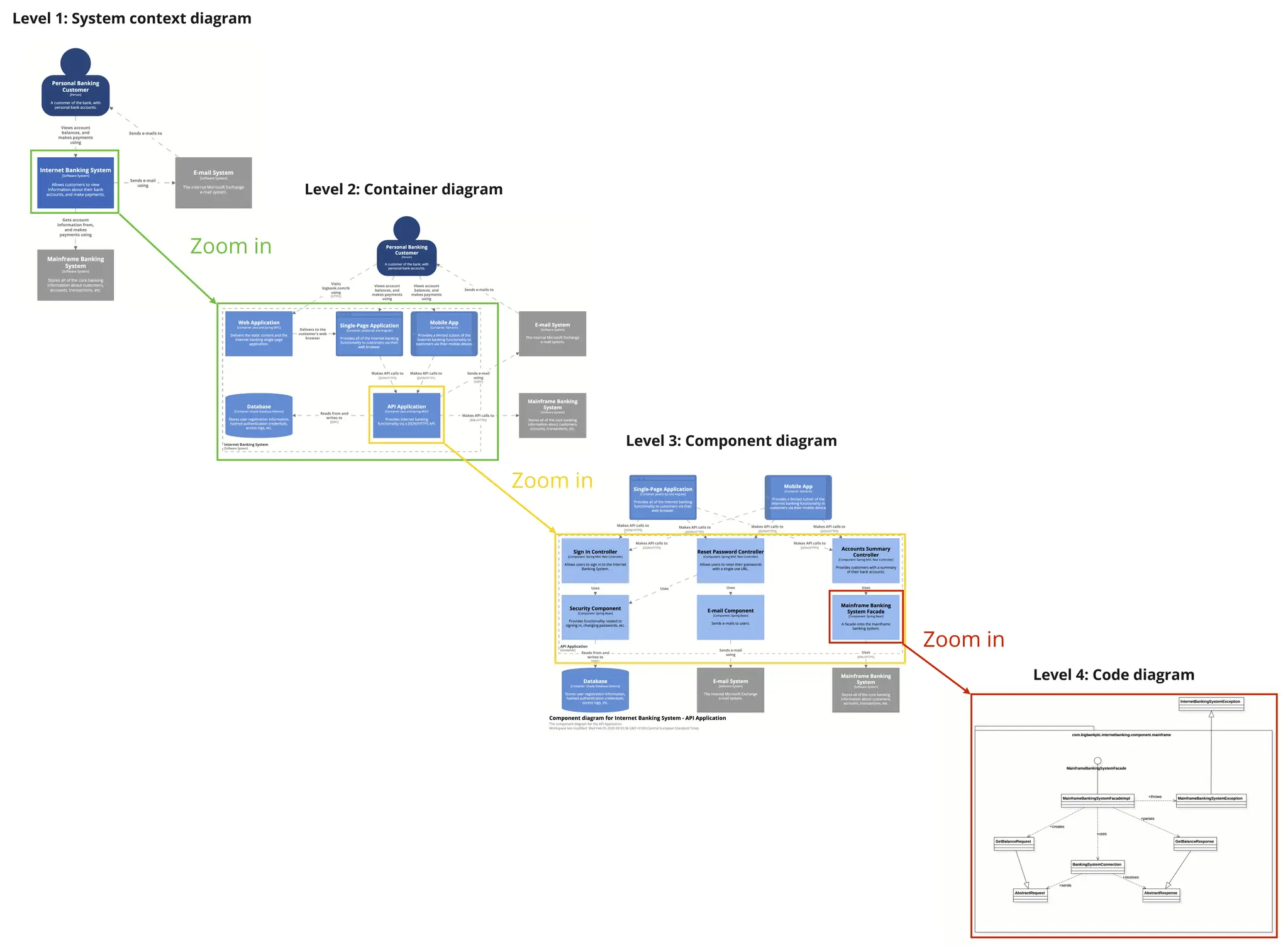
The C4 model was introduced by Simon Brown as an alternative to traditional modeling methods, which often turn out to be either too complex or not informative enough. It is based on a hierarchical approach that divides a system architecture into four levels:
- Context - a high-level overview of the system and its environment.
- Container - the high-level parts of the system (microservices, databases, and others).
- Component - the constituent elements of a container, such as modules and services.
- Code - the implementation of a specific component.
These levels make it possible to create a layered description of a system that can be useful both for technical specialists and for decision-making stakeholders.
The concept of the C4 model is shown below as an illustration.
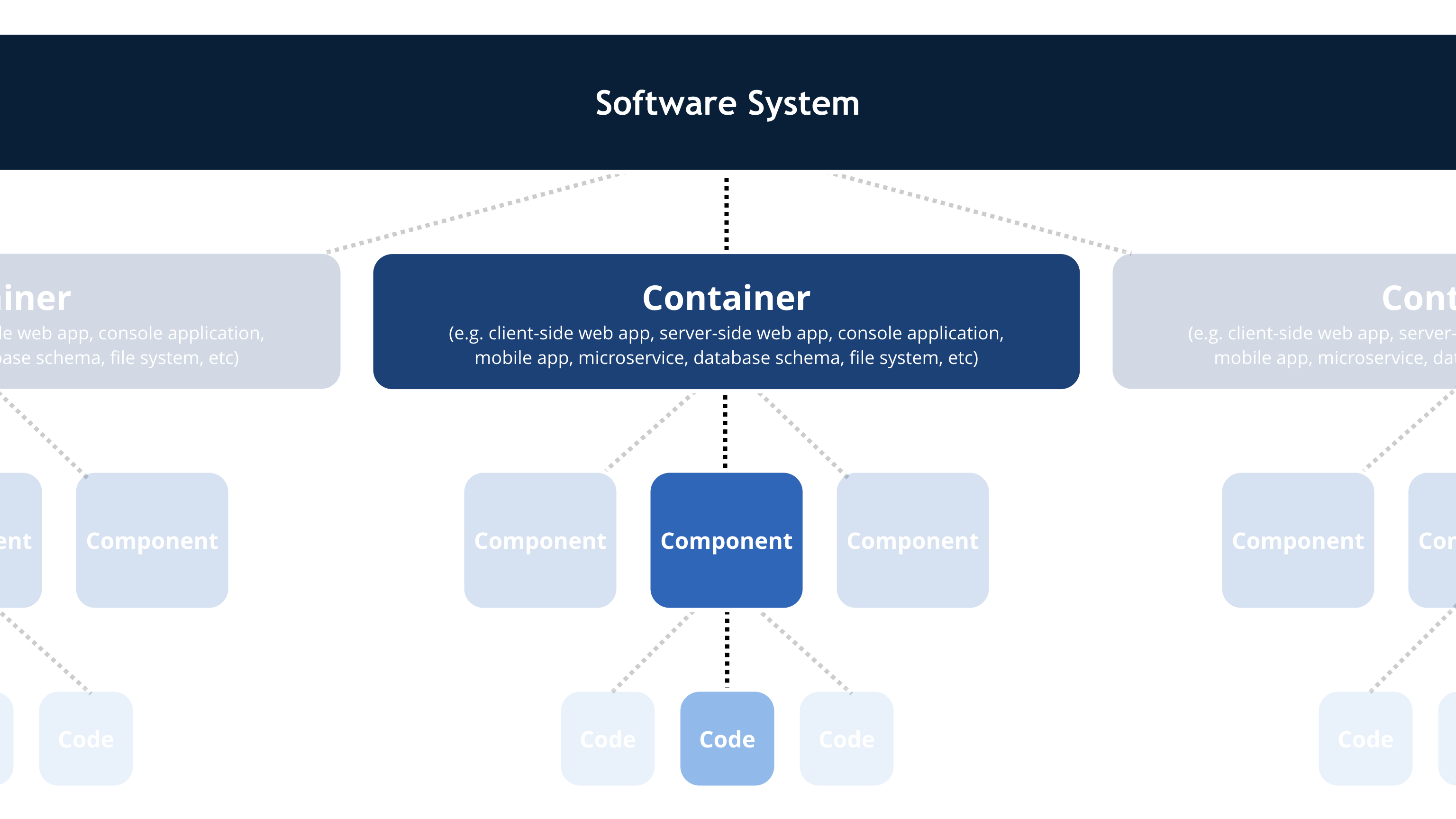
Visualization of C4 Model Levels
The following illustration shows the hierarchy of C4 model levels, starting from the general system view and ending with code-level detail.
- System - the top level, which shows the whole system and its interaction with users and external services. This level is important for business analysts, managers, and all stakeholders who need to understand the system boundary and its environment.
- Container - the next level of detail, describing the main executable parts of the system: web applications, mobile applications, databases, API services, and so on. Containers show which technologies are used and how they interact with one another.
- Component - inside containers are components that implement certain system functions. At this level, the container is logically divided into modules, services, and other software components.
- Code - the lowest level of detail, where you can examine the implementation of individual classes, methods, and data structures. This level is useful for developers when studying complex logic inside the system.
The arrows in the illustration show how one level of detail transitions into another: a system consists of containers, containers contain components, and components are implemented with code. It helps better understand how the C4 model organizes architectural description while maintaining a balance between simplicity and detail.
Detail Levels in C4
System Context Diagram
This level provides an overview of the entire system and its interaction with users and external systems. The main goal is to show which roles exist and how they interact with the system being developed.
Use case examples:
- Defining the system boundary.
- Identifying key users and external dependencies.
- Describing interactions with other systems.
Example of a context diagram:
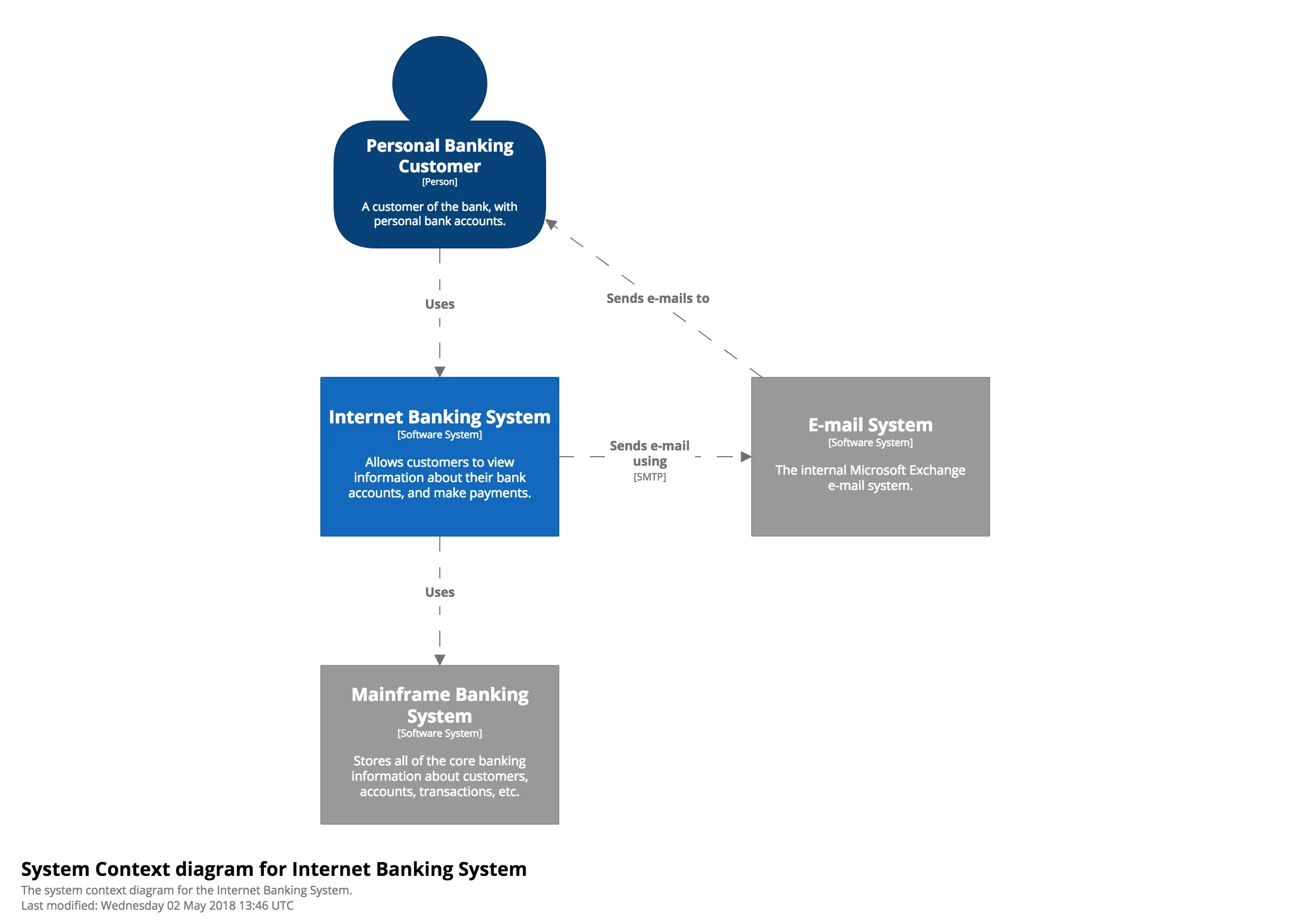 The diagram above shows that the system interacts with users and other services.
Container Diagram
Here the system is broken down into the main technological components: databases, microservices, web applications, mobile applications, and so on. A container is an executable or deployable element of the system.
Use case examples:
- Defining the architectural style (monolith, microservices, client-server).
- Choosing technologies for each container.
- Identifying integration points.
Example of a container diagram:
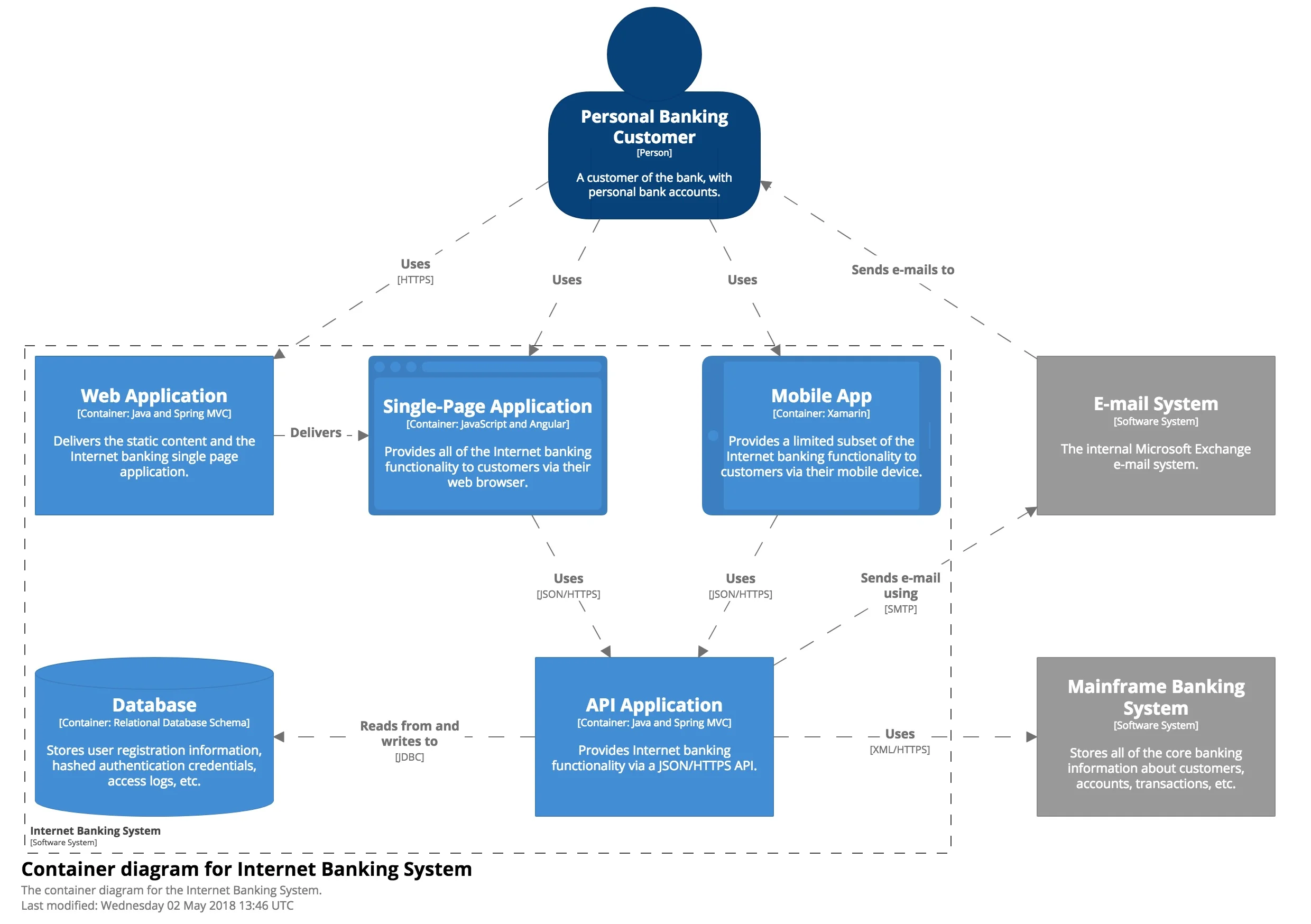 In this example, the system consists of a web application, an API service, and a database.
If a system is large and contains a significant number of services, it may be decided to group services into groups (subsystems), showing the subsystems at C2 and the services themselves at C3. This approach makes diagrams easier to understand and simplifies their development.
Component Diagram
At this level, containers are broken down into constituent parts - components that perform various functions within the container.
Use case examples:
- Documenting the breakdown of a system into modules.
- Defining APIs and interfaces between modules.
- Improving developers' understanding of the system structure.
Example of a component diagram:
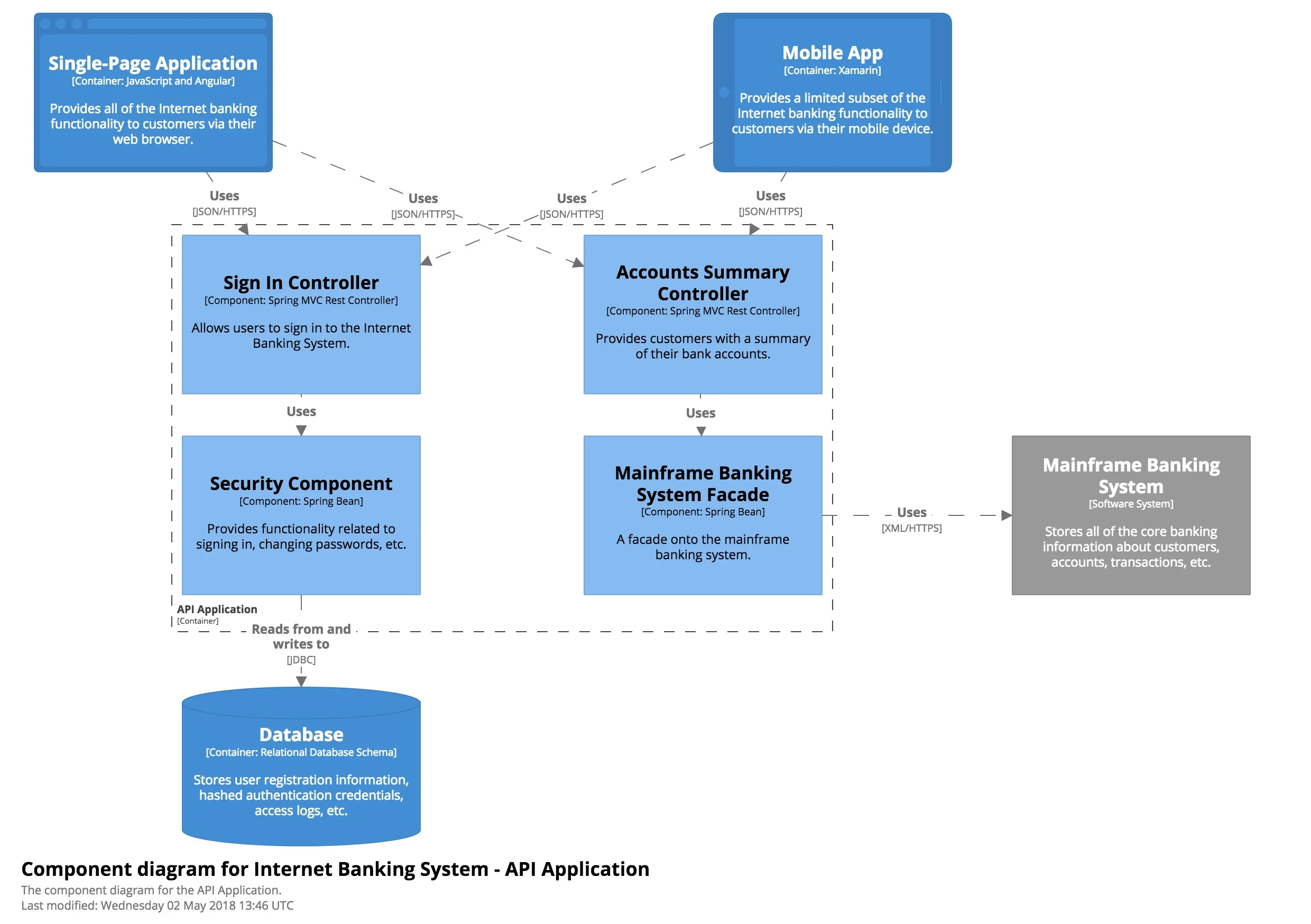 Here the modules that make up the API service are shown.
If a system is large and contains a significant number of services, it may be decided to group services into groups (subsystems), showing the subsystems at C2 and the services themselves at C3. This approach makes diagrams easier to understand and simplifies their development.
Code Diagram
Code is the most detailed level of the C4 model, showing the internal structure of components. It presents descriptions of classes, methods, interfaces, modules, or functions that implement specific system logic.
At this level, the architectural view gives way to technical implementation details. The code diagram is not part of the standard C4 model, but it can be used for detailed analysis of complex components, especially if they require strict design.
It is important to note that the Code level is most often supported automatically with code analysis and diagram generation tools (for example, PlantUML, Structurizr, Doxygen, and others), rather than being created manually.
Benefits of the C4 Model
Simplicity and clarity - diagrams are easy to read and understandable even without special UML knowledge. Flexibility - suitable for different types of architecture: microservice, monolithic, distributed. Hierarchical structure - allows the system to be detailed as needed. Focus on what matters - avoids information overload by leaving only the key details. Compatibility with other approaches - easily integrates with other documentation methods such as ArchiMate, UML, ADR.
Tools for Working with C4
To create C4 diagrams, you can use:
- Structurizr - the primary tool developed by the author of the C4 model.
- PlantUML with a C4 extension.
- Draw.io - allows you to draw C4 diagrams manually.
- Kroki.io - a service for automatic diagram generation.
- SysCraft.io - a system for describing IT architecture and maintaining project documentation.
Conclusion
The C4 model is a powerful and convenient tool for visualizing software architecture. It combines simplicity, flexibility, and layered detail, making it an excellent choice for describing modern systems. Using C4 improves understanding of architecture, simplifies communication between teams, and increases the transparency of development.